Image to flashcards
Take a photo of your notes or pick an image, and AI turns it into flashcards, concept cards and practice questions. Free with an account: 3 photos a month.
Turn a photo into cardsLast updated
Snap the page. I can read your handwriting.
From first read to exam day
What you get with every deck: up to 7 study modes
Each deck gets up to seven ways to study, in the order you learn. Start at the top, or jump to the one you need tonight.
- 1 · See it all
Roadmap
See every part of the topic and what comes next.
- 2 · Understand
Learn
Read one idea four ways until it clicks.
- 3 · Remember
Flashcards
Cards come back right before you forget them.
- 4 · Apply
Quiz
Predict what happens next, like an exam question.
- 5 · See it work
Step by step
Watch a process happen one move at a time.
- 6 · Say it
Interview
Answer out loud in 60 seconds, then compare.
- 7 · Every day
Daily mission
A 20-minute plan picked for you each day, mixing the modes above.
Got an exam date? Add it and your daily mission plans backwards from it.
Plan for an examHow do I turn a photo into flashcards?
Four steps. You take the photo, the AI drafts the deck, you check it.
- 01Sign in with your email (free, no password) and open New deck.
- 02Pick the Photo tab. Take photo opens your camera; Choose photos picks images from your gallery or computer.
- 03Add one photo for each page and put them in order. AI reads the printed or handwritten text and splits it into parts, each with concept cards, flashcards, questions and a mission.
- 04Fix anything it misread in the deck editor. Your photos stay with the deck, so you can check a card against the page.
What does the AI make from a photo of my notes?
On the left, a photo of handwritten notes. On the right, cards a deck makes from it. Tap them: they're the real study screens.
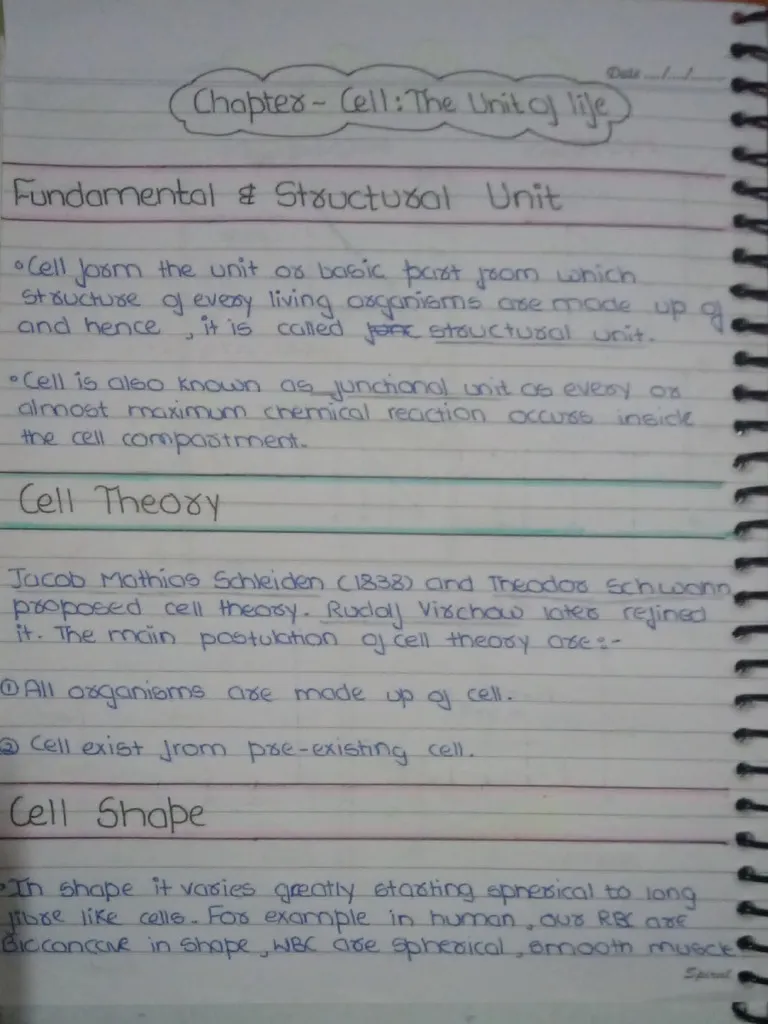
Cell theory
Plain EnglishSchleiden (1838) and Schwann said that every living thing is made of cells. Virchow later added that every cell comes from a cell that already existed.
What are the two main ideas of cell theory?
All organisms are made of cells, and every cell comes from a cell that already existed.
Say the answer in your head, then tap the card.
Which images can it read?
Any photo or screenshot with words you can read yourself. The AI reads words, so a drawing with no labels gives it nothing to work with.
| What you bring | What happens |
|---|---|
| Photo of a notebook, worksheet or textbook page | What happensAI reads the printed or handwritten text |
| Screenshot of slides, a website or an e-book | What happensRead like any other photo |
| Long screenshot, like a scrolled web page | What happensCut into up to 3 pieces so the text stays big enough to read. Each piece counts as a photo, and you're asked first. |
| Image bigger than 20 MB | What happensTurned away before it opens, because it can freeze a phone. Save it smaller and add it again. |
| Blurry photo, or one with no words | What happensSkipped, and the photo goes back to your monthly count |
Free reads 3 photos a month, Basic 15 and Premium 100. See every plan's limits.
Got the chapter as a file instead? PDF to flashcards reads the whole PDF at once.
How do I take a photo the AI can read?
If you can read it on your phone screen, the AI can read it too.
- One page per photo, filling most of the frame.
- Good light and no shadow from your phone across the page.
- Hold the phone flat above the page so the lines stay straight.
- Zoom in on the photo before you add it. Blurry words become wrong cards.
Can I add photos to a deck I already have?
Yes. Open the deck, press Add from photos and choose which section the new cards go in, or start a new one. Each photo counts the same as on a new deck.
What should I check before I study?
AI drafts are good, not perfect, and handwriting is where misreads happen. Two minutes of checking saves weeks of reviewing a wrong card.
- Compare names, numbers and formulas with your photo. A misread 7 or a missing minus sign is easy to miss.
- Delete cards about things you don't need to know.
- Rename the deck and its parts so you can find them later.
Snap your next page.
Sign in with your email, open New deck and pick the Photo tab. The deck shows up part by part while it's being made.
Turn a photo into cardsSee you tomorrow?